Enter your products once
Item codes, photos, units and specifications live in the catalog. Import an Excel or CSV file in one go, and add items that are not in the catalog by hand.
From your catalog to the quote, from the quote to the order.
Enter your products and price lists once. Offerneta fills in photos, prices, discounts and tax on every quote. Send it as a PDF and turn it into an order when the customer accepts.
No credit card needed. Quotes in English or Turkish; US dollars, euros or Turkish lira.


Offerneta is quoting software for manufacturers, wholesalers and distributors. You enter your products and price lists once, then create branded PDF quotes, proforma invoices and orders from them. Who is it for?
You set up the catalog once; every quote after that takes a few minutes.
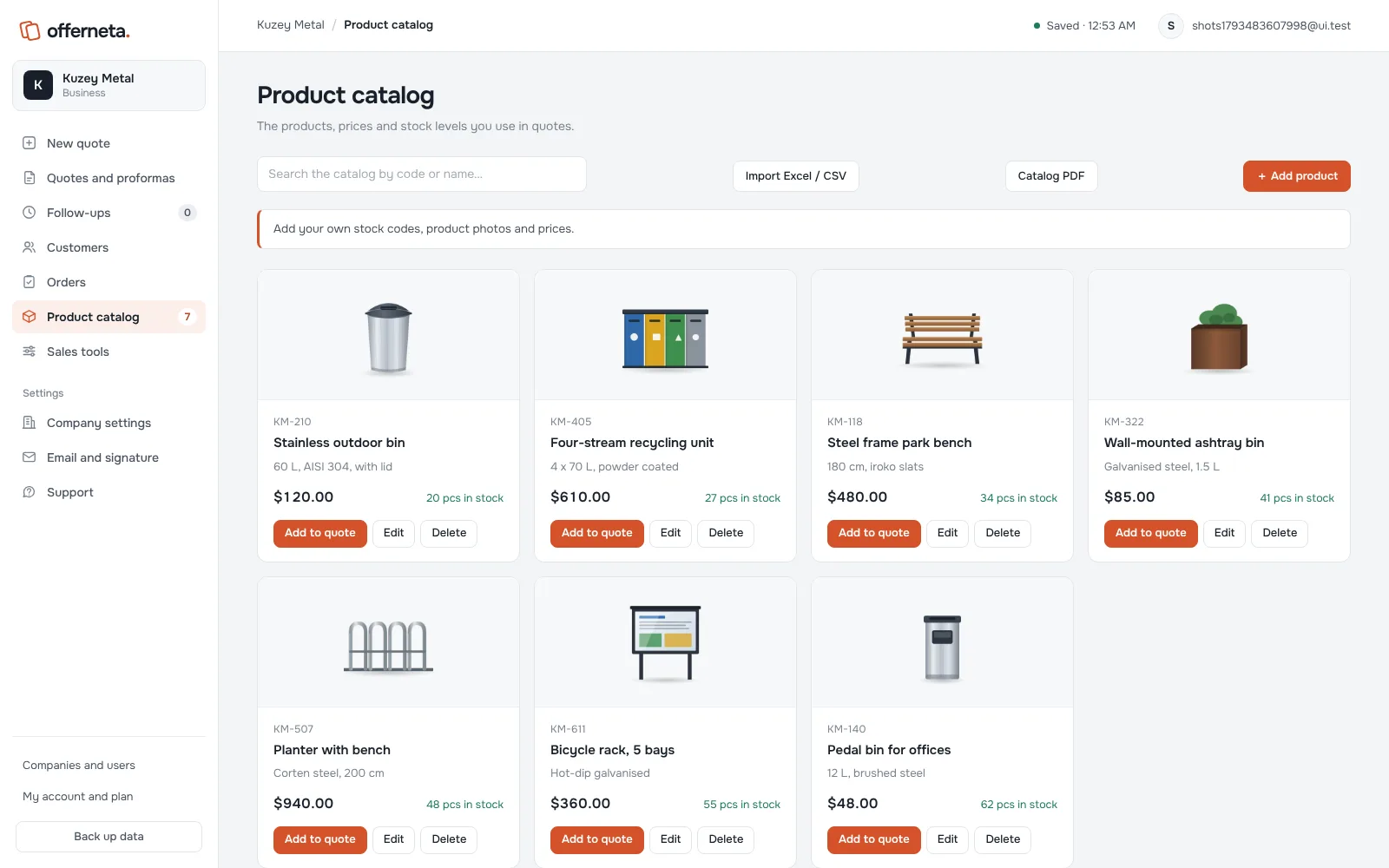
Every step from the catalog to the order happens in one panel.
Item codes, photos, units and specifications live in the catalog. Import an Excel or CSV file in one go, and add items that are not in the catalog by hand.
Dealer and customer price lists, quantity breaks, and percentage or fixed discounts. Tax and the grand total are calculated for you.
Create quotes in English or Turkish with your logo, company details and product photos. When you revise a quote, the previous version is kept.
Unit cost and margin are visible only to people you allow. A quote that goes over your discount or margin limit waits for a manager’s approval.
Download the PDF and send it by email or WhatsApp. Update the quote status; quotes that need a follow-up appear in the follow-up list.
Create a proforma invoice and an order from an accepted quote. Track production, shipping and payment, and export your records as CSV.
Cost and margin are visible only to people you allow. A quote that goes over your discount limit waits for a manager’s approval before it is sent.
Manager approval needed
The sales rep does not see the cost on this screen, only that approval is needed.
Start with a 7-day free trial or choose a plan right away.
Businesses where one person prepares quotes
Price on request
Companies that quote regularly, and sales teams
Price on request
Larger sales teams that work by rules
Price on request
Prices are in US dollars. Before you pay, we confirm the final amount with you, including any taxes that apply.
If your price quotes are built from a product list, quoting software saves the same work every day. That is typical for manufacturers, wholesalers, distributors and project companies. Each quote repeats the same product names, photos, specifications and prices.
When quotes are made in Word or Excel, those details are copied by hand. Prices drift between files, old versions get sent by mistake, and nobody can see which customer received which price.
You enter products and price lists once. A new quote is then a matter of choosing the customer and the products. Offerneta applies the customer’s price list, the discount and tax, and calculates the total.
Offerneta is not accounting software. It does not issue tax invoices, and it has no live currency conversion. You can export documents and lines as CSV for your accounting system.
The quickest way to judge it is with your own products. The 7-day trial needs no credit card.
Last updated: 1 November 2026 · By the Offerneta team
Quoting software turns your product, price and customer data into a price quote document. In Offerneta you pick products from your catalog; photos, units, discounts, tax and the total fill in automatically. You send the quote as a PDF, and when it is accepted it becomes a proforma invoice and an order.
You can try Offerneta free for 7 days without a credit card. Prices for each plan are on the pricing page.
In Excel, product details, photos and formulas are copied by hand for every quote. Versions get mixed up, and nobody can see which price went to which customer. In Offerneta products are entered once, discounts and tax are always calculated the same way, and each quote keeps its status and revision history.
A quote is a price offer and is not binding until the customer accepts it. A proforma invoice is issued for an accepted quote and is used for payment or import paperwork; it is not a tax invoice. In Offerneta you create a proforma invoice from an accepted quote with one click.
Yes. You can use the panel in English or Turkish and switch at any time from your account page. Quotes and proforma invoices can be in English or Turkish, whatever language your panel uses.
Quotes can be in US dollars, euros or Turkish lira. You enter product prices yourself; there is no automatic currency conversion.
When you sign up, you get your own company workspace. The trial lasts 7 days and includes all Professional features; you can invite up to 3 people. No credit card is needed and the trial does not turn into a paid subscription by itself.
Choose a plan on your account page. We then contact you to confirm the amount and send payment details, and your plan is activated once payment is received. Online card payment in US dollars is not available yet.
Your product, customer and quote records are stored in a separate area for your company on Offerneta’s servers, and only users you authorize can access them. Connections are encrypted with HTTPS. The company admin can download a backup file of the records at any time.
Yes. You match the columns in your XLSX or CSV file, preview them and import. A file can be up to 4 MB, and the catalog holds up to 10,000 products. You add product photos from the product card.
No credit card needed. The trial includes all Professional features, and you can invite up to 3 people from your team.